
"The fragility of crystal is fineness not weakness."
"If we admit that human life can be ruled by a reason, possibility of life gets destroyed."
u·biq·ui·tous (y-bkw-ts)
adj.Being or seeming to be everywhere at the same time; omnipresent:
Saturday, June 28, 2008

Sunday, June 22, 2008
Awakening the Giant Within: Dreams of Destiny
I decided I would never settle for less than I could be.
Its the moment of your decision your destiny is shaped.
The way to take better decision is to take more of them.
Repetition is mother of skill.
"It is in your moments of decision your destiny is shaped." (Anthony Robbins)
"I am not discouraged because every wrong attempt discarded is another step forward." (Thomas Edison)
There are no failures in life.
"Life is either a daring adventure or nothing."(Helen Keller)
Know that it is your decisions and not your conditions that determines your destiny.
- Most People fail in life simply because they have major in minor things.
- For changes to be of any true value, they've got to be lasting and consistent.
- Principles of making a lasting change
- Raise your standards
- Change your limiting beliefs
- Change your strategy
Its the moment of your decision your destiny is shaped.
The way to take better decision is to take more of them.
Repetition is mother of skill.
"It is in your moments of decision your destiny is shaped." (Anthony Robbins)
"I am not discouraged because every wrong attempt discarded is another step forward." (Thomas Edison)
There are no failures in life.
"Life is either a daring adventure or nothing."(Helen Keller)
Know that it is your decisions and not your conditions that determines your destiny.
Tuesday, June 17, 2008
Lesson for today.
Destiny is defined nobody can change it.
Just execute your plan and think of nothing else.
If its success then its your Destiny and If its failure then also it will be the same.
Just do not think
Just execute your plan and think of nothing else.
If its success then its your Destiny and If its failure then also it will be the same.
Just do not think
Tuesday, June 10, 2008
Awakening the Giant Within
If you dont set a baseline standard for what you would accept in your life you will find it easy to slip into behaviour and attitude or a quality of life thats far below what you deserve.
Friday, May 2, 2008
असफल होने का सहसा ही सफलता तक पहुचाता है|
गुलमोहर तो गर्मियों मी ही खिलते है
यह तो सवाल है की सैंकडो सही निर्णय आपकी ज़िंदगी को संवार ना सके लेकिन इसे उजड़ने के लिए एक ग़लत निर्णय पर्याप्त है
यदि आप ट्रेन मी सफर कर रहे तो आप चल नही रहे है जा रहे है
महत्वपूर्ण आप नही है, बल्कि वो लोग है जो आपको महत्वपूर्ण समझ रहे है
दावा काम नही करता दवा कीजिये, दुआ कीजिये और ये दोनों काम करते है
काम स्वयं मी एक पुरुस्कार है, न की पुरुस्कार दिलाने वाला
हमारे दुःख बड़े नही होते दुःख को सहन करने की हमारी ताकत चोटी हो जाती है
तीखे मोदो को धीरे से ही पार किया जा सकता है
ट्रक को ओवर टेक करके जैसे ही आप आगे निकलते है, थोडी देर मी फिर से एक नया ट्रक आपके आगे चल रहा होत है ज़िंदगी भी यही है
असफल होने का सहसा ही सफलता तक पहुचाता है
यह तो सवाल है की सैंकडो सही निर्णय आपकी ज़िंदगी को संवार ना सके लेकिन इसे उजड़ने के लिए एक ग़लत निर्णय पर्याप्त है
यदि आप ट्रेन मी सफर कर रहे तो आप चल नही रहे है जा रहे है
महत्वपूर्ण आप नही है, बल्कि वो लोग है जो आपको महत्वपूर्ण समझ रहे है
दावा काम नही करता दवा कीजिये, दुआ कीजिये और ये दोनों काम करते है
काम स्वयं मी एक पुरुस्कार है, न की पुरुस्कार दिलाने वाला
हमारे दुःख बड़े नही होते दुःख को सहन करने की हमारी ताकत चोटी हो जाती है
तीखे मोदो को धीरे से ही पार किया जा सकता है
ट्रक को ओवर टेक करके जैसे ही आप आगे निकलते है, थोडी देर मी फिर से एक नया ट्रक आपके आगे चल रहा होत है ज़िंदगी भी यही है
असफल होने का सहसा ही सफलता तक पहुचाता है
Saturday, October 13, 2007
Peoplesoft Peoplecode
Difference Between DoSave and DoSaveNow
DoSave can be used only in FieldEdit, FieldChange, or MenuItemSelected PeopleCode.
DoSave defers processing to the end of the current PeopleCode program event, as distinct from DoSaveNow, which causes save processing (including SaveEdit, SavePreChange, SavePostChange, and Workflow PeopleCode) to be executed immediately.
SetNextPage()
SetNextPage("PAGE_2");DoSave( );TransferPage( );
AddKeyListItem
AddKeyListItem(field, value)
Description
Use the AddKeyListItem to add a new key field and its value to the current list of keys. It enables PeopleCode to help users navigate through related pages without being prompted for key values. A common use of AddKeyListItem is to add a field to a key list and then transfer to a page which uses that field as a key.
The following example creates a key list using AddKeyListItem and transfers the user to a page named VOUCHER_INQUIRY_FS.AddKeyListItem(VNDR_INQ_VW_FS.BUSINESS_UNIT, ASSET_ACQ_DET.BUSINESS_UNIT_AP);
AddKeyListItem(VNDR_INQ_VW_FS.VOUCHER_ID, ASSET_ACQ_DET.VOUCHER_ID);
TransferPage("VOUCHER_INQUIRY_FS");
TransferPage
Syntax
TransferPage([PAGE.page_name_name])
Description
Use the TransferPage function to transfer control to the page indicated by PAGE. page__namename within, or to the page set with the SetNextPage function. The page that you transfer to must be in the current component or menu. To transfer to a page outside the current component or menu, or to start a separate instance of PeopleTools prior to transfer into, use the Transfer function.
SQLExec
SyntaxSQLExec({sqlcmd SQL.sqlname}, bindexprs, outputvars)
where bindexprs is a list of expressions, one for each :n reference within sqlcmd or the text found in the SQL defintion sqlname, in the form: inexpr_1 [, inexpr_2]. . .
and where outputvars is a list of variables, record fields, or record object references, one for each column selected by the SQL command, in the form: out_1 [, out_2]. . .
Description
Use the SQLExec function to execute a SQL command from within a PeopleCode program by passing a SQL command string. The SQL command bypasses the Component Processor and interacts with the database server directly. If you want to delete, insert, or update a single record, use the corresponding PeopleCode record object method.
If you want to delete, insert, or update a series of records, all of the same type, use the CreateSQL or GetSQL functions, then the Execute SQL class method.
Limitation of SQLExec SELECT Statement
SQLExec can only Select a single row of data. If your SQL statement (or your SQL.sqlname statement) retrieves more than one row of data, SQLExec sends only the first row to its output variables. Any subsequent rows are discarded. This means if you want to fetch only a single row, SQLExec can perform better than the other SQL functions, because only a single row is fetched. If you need to SELECT multiple rows of data, use the CreateSQL or GetSQL functions and the Fetch SQL class method. You can also use ScrollSelect or one of the Select methods on a rowset object to read rows into a (usually hidden) work scroll.
Note. The PeopleSoft record name specified in the SQL SELECT statement must be in uppercase.
Limitations of SQLExec UPDATE, DELETE, and INSERT Statements
SQLExec statements that result in a database update (specifically, UPDATE, INSERT, and DELETE) can only be issued in the following events:
SavePreChange
WorkFlow
SavePostChange
FieldChange
Remember that SQLExec UPDATEs, INSERTs, and DELETEs go directly to the database server, not to the Component Processor (although SQLExec can look at data in the buffer using bind variables included in the SQL string). If a SQLExec assumes that the database has been updated based on changes made in the component, that SQLExec can be issued only in the SavePostChange event, because before SavePostChange none of the changes made to page data has actually been written back to the database.
Setting Data Fields to Null
SQLExec does not set Component Processor data buffer fields to NULL after a row not found fetching error. However, it does set fields that aren’t part of the Component Processor data buffers to NULL. Work record fields are also reset to NULL.
Using Meta-SQL in SQLExec
Different DBMS platforms have slightly different formats for dates, times, and datetimes; and PeopleSoft has its own format for these data types as well. Normally the Component Processor performs any necessary conversions when platform-specific data types are read from the database into the buffer or written from the buffer back to the database.
When an SQLExec statement is executed, these automatic conversions don't take place. Instead, you need to use meta-SQL functions inside the SQL command string to perform the conversions. The basic types of meta-SQL functions are:
General functions that expand at runtime to give you lists of fields, key fields, record fields, and so on. %InsertSelect or %KeyEqual are typical examples.
In functions that expand at runtime into platform-specific SQL within the WHERE clause of a SELECT or UPDATE statement or in an INSERT statement. %DateIn is a typical example.
Out functions that expand at runtime into platform-specific SQL in the main clause of SELECT statement. %DateOut is a typical example.
Following is an example of an SQL SELECT using both and "in" and "out" metastring:select emplid, %dateout(effdt) from PS_CAR_ALLOC a where car_id = '" ®ISTRATION_NO "' and plan_type = '" &PLAN_TYPE
"' and a.effdt = (select max (b.effdt) from PS_CAR_ALLOC b where a.emplid=b.emplid and b.effdt <= %currentdatein) and start_dt
<= %currentdatein and (end_dt is null or end_dt >= %currentdatein)";
See Meta-SQL.
Bind Variables in SQLExec
Bind variables are references within the sqlcmd string to record fields listed in bindvars. Within the string, the bind variables are integers preceded by colons: :1, :2,. . .
The integers need not in numerical order. Each of these :n integers represents a field specifier in the bindvars list, so that :1 refers to the first field reference in bindvars, :2 refers to the second field reference, and so on.
For example, in the following statement:SQLExec("Select sum(posted_total_amt)
from PS_LEDGER
where deptid between :1 and :2", DEPTID_FROM, DEPTID_TO, &SUM);
:1 is replaced by the value contained in the record field DEPTID_FROM; :2 is replaced by the value contained in the record field DEPTID_TO.
Note the following points:
Bind variables can be used to refer to long character (longchar) fields. Long character fields are represented in PeopleCode as strings. You should use %TextIn() Meta-SQL to ensure these fields are represented correctly on all database platforms.
Bind variables can be passed as parameters to meta-SQL functions, for example:SQLExec(". . .%datein(:1). . .", START_DT, &RESULT)
If a bind variable :n is a Date field that contains a null value, SQLExec replaces all occurrences of ":n" located before the first WHERE clause with "NULL" and all occurrences of "= :n" located after the first WHERE to "IS NULL".
Inline Bind Variables in SQLExec
Inline bind variables are included directly in the SQL string in the form::recordname.fieldname
The following example shows the same SQLExec statement with standard bind variables, then with inline bind variables:Rem without Inline Bind Variables;
SQLExec("Select sum(posted_total_amt)
from PS_LEDGER
where deptid between :1 and :2", deptid_from, deptid_to, &sum);
Rem with Inline Bind Variables;
SQLExec("Select sum(posted_total_amt)
from PS_LEDGER
where deptid between :LEDGER.DEPTID_FROM
and :LEDGER.DEPTID_TO", &sum);
Inline bind variables, like all field and record references enclosed in strings, are considered by PeopleTools as a "black box". If you rename records and fields, PeopleTools does not update record and field names that are enclosed in strings as inline bind variables. For this reason, you should use standard bind variable in preference to inline bind variables wherever standard bind variables are available (as they are in SQLExec).
Prior to PeopleTools 8.0, PeopleCode replaced runtime parameter markers in SQL strings with the associated literal values. For databases that offer SQL statement caching, a match was never found in the cache so the SQL had to be re-parsed and re-assigned a query path. However, with PeopleTools 8.0, PeopleCode passes in bind variable parameter markers. For databases with SQL caching, this can offer significant performance improvements.
If you use inline bind variables, they will still be passed as literals to the database. However, if you convert them to bind variables, you may see significant performance improvements.
Output Variables in SQLExec
If you use SQLExec to Select a row of data, you must place the data into variables or record fields so that it can be processed. You list these variables or fields, separated by commas in the output part of the statement following the bindvars list. Supply one variable or field for each column in the row of data retrieved by SQLExec. They must be listed in the same order in which the columns will be selected.
The number of output variables cannot exceed 64.
Using Arrays for Bind Variables
You can now use a parameter of type Array of Any in place of a list of bind values or in place of a list of fetch result variables. This is generally used when you don't know how many values are needed until the code runs.
For example, suppose that you had some PeopleCode that dynamically (that is, at runtime) generated the following SQL statement:&Stmt = "INSERT INTO PS_TESTREC (TESTF1, TESTF2, TESTF3, TESTF4, . . . N) VALUES (:1, :2, %DateTimeIn(:3), %TextIn(:4), . . .N)";
Suppose you have placed the values to be inserted into an Array of Any, say &AAny:&AAny = CreateArrayAny("a", 1, %DateTime, "abcdefg", . . .N);
You can execute the insert by:SQLExec(&Stmt, &AAny);
Because the Array of Any promotes to absorb any remaining select columns, it must be the last parameter for the SQL object Fetch method or (for results) SQLExec. For binding, it must be the only bind parameter, as it is expected to supply all the bind values needed.
SQLExec Maintenance Issues
SQLExec statements are powerful, but they can be difficult to upgrade and maintain. If you use a SQL string passed in the command, it’s considered a "black box" by PeopleCode. If field names or table names change during an upgrade, table and field references within the SQL string are not updated automatically. For these reasons, you should use a SQL definition and the meta-SQL statements provided in PeopleTools 8.0, instead of typing in a SQL string.
Generally, you should use SQLExec only when you must interact directly with the database server and none of the ScrollSelect functions, or record class methods (which are somewhat easier to maintain) will serve your purpose effectively.
Be Careful How You Use It
SQLExec performs any SQL statement the current Access ID has database privileges to perform. This normally includes SELECT, INSERT, UPDATE, and DELETE statements against application data tables. However, you can set up users to use Access IDs with more privileges (typically, AccessIDs have full database administrator authority). In such cases, the user could alter the structure of tables using SQLExec, or even drop the database.
Warning! The PeopleSoft application will not stop the end-user from doing anything that the Access ID has privileges to do on the database server, so be very careful what you write in an SQLExec statement.
Parameters
sqlcmd SQL.sqlname
Specify either a String containing the SQL command to be executed or a reference to an existing SQL definition. This string can include bind variables, inline bind variables, and meta-SQL.
bindexprs
A list of expressions, each of which corresponds to a numeric (:n) bind variable reference in the SQL command string. It can also be a reference to a record object or an array of Any containing all the bind values. See Bind Variables in SQLEXEC for more details.
outputvars
A list of PeopleCode variables or record fields to hold the results of a SQL SELECT. There must be one variable for each column specified in the SELECT statement. It can also be a reference to a record object or an Array of Any that contains all the selected values.
Returns
Optionally returns a Boolean value indicating whether the function executed successfully.
Note. Not returning a row is not considered an error. If this is a concern, consider using the %SqlRows system variable after your call to SQLExec.
Example
The following example, illustrates a SELECT statement in a SQLExec:SQLExec("SELECT COUNT(*) FROM PS_AE_STMT_TBL WHERE AE_PRODUCT = :1 AND AE_APPL_ID = :2 AND AE_ADJUST_STATUS = 'A' ", AE_APPL_TBL.AE_PRODUCT,
AE_APPL_TBL.AE_APPL_ID, AE_ADJ_AUTO_CNT);
Note the use of bind variables, where :1 and :2 correspond to AE_APPL_TBL.AE_PRODUCT and AE_APPL_TBL.AE_APPL_ID. AE_ADJ_AUTO_CNT is an output field to hold the result returned by the SELECT.
The next example is also a straightforward SELECT statement, but one which uses the %datein meta-SQL function, which expands to appropriate platform-specific SQL for the :5 bind variable: SQLExec("SELECT 'X', AE_STMT_SEG FROM PS_AE_STMT_B_TBL where AE_PRODUCT = :1 AND AE_APPL_ID = :2 AND AE_SECTION = :3 AND
DB_PLATFORM = :4 AND EFFDT = %datein(:5) AND AE_STEP = :6 AND AE_STMT_TYPE = :7 AND AE_SEQ_NUM = :8", AE_STMT_TBL.AE_PRODUCT,
AE_STMT_TBL.AE_APPL_ID, AE_STMT_TBL.AE_SECTION, AE_STMT_TBL.DB_PLATFORM, AE_STMT_TBL.EFFDT, AE_STMT_TBL.AE_STEP, AE_STMT_TBL.AE_STMT_TYPE,
&SEG, &EXIST, &STMT_SEG);
This last example (in SavePreChange PeopleCode) passes an INSERT INTO statement in the SQL command string. Note the use of a date string this time in the %datein meta-SQL, instead of a bind variable: SQLExec("INSERT INTO PS_AE_SECTION_TBL ( AE_PRODUCT, AE_APPL_ID, AE_SECTION, DB_PLATFORM, EFFDT, EFF_STATUS, DESCR, AE_STMT_CHUNK_SIZE,
AE_AUTO_COMMIT, AE_SECTION_TYPE ) VALUES ( :1, :2, :3, :4, %DATEIN('1900-01-01'), 'A', ' ', 200, 'N', 'P' )", AE_APPL_TBL.AE_PRODUCT,
AE_APPL_TBL.AE_APPL_ID, AE_SECTION, DB_PLATFORM);
In the following example, a SQLExec statement is used to select into a record object. Local Record &DST;
&DST = CreateRecord(RECORD.DST_CODE_TBL);
&DST.SETID.Value = GetSetId(FIELD.BUSINESS_UNIT, DRAFT_BU, RECORD.DST_CODE_TYPE, "");
&DST.DST_ID.Value = DST_ID_AR;
SQLExec("%SelectByKeyEffDt(:1,:2)", &DST, %Date, &DST);
/* do further processing using record methods and properties */
See Also
CreateSQL, FetchSQL, GetSQL, StoreSQL, ScrollSelect.
SQL Class
DoSave can be used only in FieldEdit, FieldChange, or MenuItemSelected PeopleCode.
DoSave defers processing to the end of the current PeopleCode program event, as distinct from DoSaveNow, which causes save processing (including SaveEdit, SavePreChange, SavePostChange, and Workflow PeopleCode) to be executed immediately.
SetNextPage()
SetNextPage("PAGE_2");DoSave( );TransferPage( );
AddKeyListItem
AddKeyListItem(field, value)
Description
Use the AddKeyListItem to add a new key field and its value to the current list of keys. It enables PeopleCode to help users navigate through related pages without being prompted for key values. A common use of AddKeyListItem is to add a field to a key list and then transfer to a page which uses that field as a key.
The following example creates a key list using AddKeyListItem and transfers the user to a page named VOUCHER_INQUIRY_FS.AddKeyListItem(VNDR_INQ_VW_FS.BUSINESS_UNIT, ASSET_ACQ_DET.BUSINESS_UNIT_AP);
AddKeyListItem(VNDR_INQ_VW_FS.VOUCHER_ID, ASSET_ACQ_DET.VOUCHER_ID);
TransferPage("VOUCHER_INQUIRY_FS");
TransferPage
Syntax
TransferPage([PAGE.page_name_name])
Description
Use the TransferPage function to transfer control to the page indicated by PAGE. page__namename within, or to the page set with the SetNextPage function. The page that you transfer to must be in the current component or menu. To transfer to a page outside the current component or menu, or to start a separate instance of PeopleTools prior to transfer into, use the Transfer function.
SQLExec
SyntaxSQLExec({sqlcmd SQL.sqlname}, bindexprs, outputvars)
where bindexprs is a list of expressions, one for each :n reference within sqlcmd or the text found in the SQL defintion sqlname, in the form: inexpr_1 [, inexpr_2]. . .
and where outputvars is a list of variables, record fields, or record object references, one for each column selected by the SQL command, in the form: out_1 [, out_2]. . .
Description
Use the SQLExec function to execute a SQL command from within a PeopleCode program by passing a SQL command string. The SQL command bypasses the Component Processor and interacts with the database server directly. If you want to delete, insert, or update a single record, use the corresponding PeopleCode record object method.
If you want to delete, insert, or update a series of records, all of the same type, use the CreateSQL or GetSQL functions, then the Execute SQL class method.
Limitation of SQLExec SELECT Statement
SQLExec can only Select a single row of data. If your SQL statement (or your SQL.sqlname statement) retrieves more than one row of data, SQLExec sends only the first row to its output variables. Any subsequent rows are discarded. This means if you want to fetch only a single row, SQLExec can perform better than the other SQL functions, because only a single row is fetched. If you need to SELECT multiple rows of data, use the CreateSQL or GetSQL functions and the Fetch SQL class method. You can also use ScrollSelect or one of the Select methods on a rowset object to read rows into a (usually hidden) work scroll.
Note. The PeopleSoft record name specified in the SQL SELECT statement must be in uppercase.
Limitations of SQLExec UPDATE, DELETE, and INSERT Statements
SQLExec statements that result in a database update (specifically, UPDATE, INSERT, and DELETE) can only be issued in the following events:
SavePreChange
WorkFlow
SavePostChange
FieldChange
Remember that SQLExec UPDATEs, INSERTs, and DELETEs go directly to the database server, not to the Component Processor (although SQLExec can look at data in the buffer using bind variables included in the SQL string). If a SQLExec assumes that the database has been updated based on changes made in the component, that SQLExec can be issued only in the SavePostChange event, because before SavePostChange none of the changes made to page data has actually been written back to the database.
Setting Data Fields to Null
SQLExec does not set Component Processor data buffer fields to NULL after a row not found fetching error. However, it does set fields that aren’t part of the Component Processor data buffers to NULL. Work record fields are also reset to NULL.
Using Meta-SQL in SQLExec
Different DBMS platforms have slightly different formats for dates, times, and datetimes; and PeopleSoft has its own format for these data types as well. Normally the Component Processor performs any necessary conversions when platform-specific data types are read from the database into the buffer or written from the buffer back to the database.
When an SQLExec statement is executed, these automatic conversions don't take place. Instead, you need to use meta-SQL functions inside the SQL command string to perform the conversions. The basic types of meta-SQL functions are:
General functions that expand at runtime to give you lists of fields, key fields, record fields, and so on. %InsertSelect or %KeyEqual are typical examples.
In functions that expand at runtime into platform-specific SQL within the WHERE clause of a SELECT or UPDATE statement or in an INSERT statement. %DateIn is a typical example.
Out functions that expand at runtime into platform-specific SQL in the main clause of SELECT statement. %DateOut is a typical example.
Following is an example of an SQL SELECT using both and "in" and "out" metastring:select emplid, %dateout(effdt) from PS_CAR_ALLOC a where car_id = '" ®ISTRATION_NO "' and plan_type = '" &PLAN_TYPE
"' and a.effdt = (select max (b.effdt) from PS_CAR_ALLOC b where a.emplid=b.emplid and b.effdt <= %currentdatein) and start_dt
<= %currentdatein and (end_dt is null or end_dt >= %currentdatein)";
See Meta-SQL.
Bind Variables in SQLExec
Bind variables are references within the sqlcmd string to record fields listed in bindvars. Within the string, the bind variables are integers preceded by colons: :1, :2,. . .
The integers need not in numerical order. Each of these :n integers represents a field specifier in the bindvars list, so that :1 refers to the first field reference in bindvars, :2 refers to the second field reference, and so on.
For example, in the following statement:SQLExec("Select sum(posted_total_amt)
from PS_LEDGER
where deptid between :1 and :2", DEPTID_FROM, DEPTID_TO, &SUM);
:1 is replaced by the value contained in the record field DEPTID_FROM; :2 is replaced by the value contained in the record field DEPTID_TO.
Note the following points:
Bind variables can be used to refer to long character (longchar) fields. Long character fields are represented in PeopleCode as strings. You should use %TextIn() Meta-SQL to ensure these fields are represented correctly on all database platforms.
Bind variables can be passed as parameters to meta-SQL functions, for example:SQLExec(". . .%datein(:1). . .", START_DT, &RESULT)
If a bind variable :n is a Date field that contains a null value, SQLExec replaces all occurrences of ":n" located before the first WHERE clause with "NULL" and all occurrences of "= :n" located after the first WHERE to "IS NULL".
Inline Bind Variables in SQLExec
Inline bind variables are included directly in the SQL string in the form::recordname.fieldname
The following example shows the same SQLExec statement with standard bind variables, then with inline bind variables:Rem without Inline Bind Variables;
SQLExec("Select sum(posted_total_amt)
from PS_LEDGER
where deptid between :1 and :2", deptid_from, deptid_to, &sum);
Rem with Inline Bind Variables;
SQLExec("Select sum(posted_total_amt)
from PS_LEDGER
where deptid between :LEDGER.DEPTID_FROM
and :LEDGER.DEPTID_TO", &sum);
Inline bind variables, like all field and record references enclosed in strings, are considered by PeopleTools as a "black box". If you rename records and fields, PeopleTools does not update record and field names that are enclosed in strings as inline bind variables. For this reason, you should use standard bind variable in preference to inline bind variables wherever standard bind variables are available (as they are in SQLExec).
Prior to PeopleTools 8.0, PeopleCode replaced runtime parameter markers in SQL strings with the associated literal values. For databases that offer SQL statement caching, a match was never found in the cache so the SQL had to be re-parsed and re-assigned a query path. However, with PeopleTools 8.0, PeopleCode passes in bind variable parameter markers. For databases with SQL caching, this can offer significant performance improvements.
If you use inline bind variables, they will still be passed as literals to the database. However, if you convert them to bind variables, you may see significant performance improvements.
Output Variables in SQLExec
If you use SQLExec to Select a row of data, you must place the data into variables or record fields so that it can be processed. You list these variables or fields, separated by commas in the output part of the statement following the bindvars list. Supply one variable or field for each column in the row of data retrieved by SQLExec. They must be listed in the same order in which the columns will be selected.
The number of output variables cannot exceed 64.
Using Arrays for Bind Variables
You can now use a parameter of type Array of Any in place of a list of bind values or in place of a list of fetch result variables. This is generally used when you don't know how many values are needed until the code runs.
For example, suppose that you had some PeopleCode that dynamically (that is, at runtime) generated the following SQL statement:&Stmt = "INSERT INTO PS_TESTREC (TESTF1, TESTF2, TESTF3, TESTF4, . . . N) VALUES (:1, :2, %DateTimeIn(:3), %TextIn(:4), . . .N)";
Suppose you have placed the values to be inserted into an Array of Any, say &AAny:&AAny = CreateArrayAny("a", 1, %DateTime, "abcdefg", . . .N);
You can execute the insert by:SQLExec(&Stmt, &AAny);
Because the Array of Any promotes to absorb any remaining select columns, it must be the last parameter for the SQL object Fetch method or (for results) SQLExec. For binding, it must be the only bind parameter, as it is expected to supply all the bind values needed.
SQLExec Maintenance Issues
SQLExec statements are powerful, but they can be difficult to upgrade and maintain. If you use a SQL string passed in the command, it’s considered a "black box" by PeopleCode. If field names or table names change during an upgrade, table and field references within the SQL string are not updated automatically. For these reasons, you should use a SQL definition and the meta-SQL statements provided in PeopleTools 8.0, instead of typing in a SQL string.
Generally, you should use SQLExec only when you must interact directly with the database server and none of the ScrollSelect functions, or record class methods (which are somewhat easier to maintain) will serve your purpose effectively.
Be Careful How You Use It
SQLExec performs any SQL statement the current Access ID has database privileges to perform. This normally includes SELECT, INSERT, UPDATE, and DELETE statements against application data tables. However, you can set up users to use Access IDs with more privileges (typically, AccessIDs have full database administrator authority). In such cases, the user could alter the structure of tables using SQLExec, or even drop the database.
Warning! The PeopleSoft application will not stop the end-user from doing anything that the Access ID has privileges to do on the database server, so be very careful what you write in an SQLExec statement.
Parameters
sqlcmd SQL.sqlname
Specify either a String containing the SQL command to be executed or a reference to an existing SQL definition. This string can include bind variables, inline bind variables, and meta-SQL.
bindexprs
A list of expressions, each of which corresponds to a numeric (:n) bind variable reference in the SQL command string. It can also be a reference to a record object or an array of Any containing all the bind values. See Bind Variables in SQLEXEC for more details.
outputvars
A list of PeopleCode variables or record fields to hold the results of a SQL SELECT. There must be one variable for each column specified in the SELECT statement. It can also be a reference to a record object or an Array of Any that contains all the selected values.
Returns
Optionally returns a Boolean value indicating whether the function executed successfully.
Note. Not returning a row is not considered an error. If this is a concern, consider using the %SqlRows system variable after your call to SQLExec.
Example
The following example, illustrates a SELECT statement in a SQLExec:SQLExec("SELECT COUNT(*) FROM PS_AE_STMT_TBL WHERE AE_PRODUCT = :1 AND AE_APPL_ID = :2 AND AE_ADJUST_STATUS = 'A' ", AE_APPL_TBL.AE_PRODUCT,
AE_APPL_TBL.AE_APPL_ID, AE_ADJ_AUTO_CNT);
Note the use of bind variables, where :1 and :2 correspond to AE_APPL_TBL.AE_PRODUCT and AE_APPL_TBL.AE_APPL_ID. AE_ADJ_AUTO_CNT is an output field to hold the result returned by the SELECT.
The next example is also a straightforward SELECT statement, but one which uses the %datein meta-SQL function, which expands to appropriate platform-specific SQL for the :5 bind variable: SQLExec("SELECT 'X', AE_STMT_SEG FROM PS_AE_STMT_B_TBL where AE_PRODUCT = :1 AND AE_APPL_ID = :2 AND AE_SECTION = :3 AND
DB_PLATFORM = :4 AND EFFDT = %datein(:5) AND AE_STEP = :6 AND AE_STMT_TYPE = :7 AND AE_SEQ_NUM = :8", AE_STMT_TBL.AE_PRODUCT,
AE_STMT_TBL.AE_APPL_ID, AE_STMT_TBL.AE_SECTION, AE_STMT_TBL.DB_PLATFORM, AE_STMT_TBL.EFFDT, AE_STMT_TBL.AE_STEP, AE_STMT_TBL.AE_STMT_TYPE,
&SEG, &EXIST, &STMT_SEG);
This last example (in SavePreChange PeopleCode) passes an INSERT INTO statement in the SQL command string. Note the use of a date string this time in the %datein meta-SQL, instead of a bind variable: SQLExec("INSERT INTO PS_AE_SECTION_TBL ( AE_PRODUCT, AE_APPL_ID, AE_SECTION, DB_PLATFORM, EFFDT, EFF_STATUS, DESCR, AE_STMT_CHUNK_SIZE,
AE_AUTO_COMMIT, AE_SECTION_TYPE ) VALUES ( :1, :2, :3, :4, %DATEIN('1900-01-01'), 'A', ' ', 200, 'N', 'P' )", AE_APPL_TBL.AE_PRODUCT,
AE_APPL_TBL.AE_APPL_ID, AE_SECTION, DB_PLATFORM);
In the following example, a SQLExec statement is used to select into a record object. Local Record &DST;
&DST = CreateRecord(RECORD.DST_CODE_TBL);
&DST.SETID.Value = GetSetId(FIELD.BUSINESS_UNIT, DRAFT_BU, RECORD.DST_CODE_TYPE, "");
&DST.DST_ID.Value = DST_ID_AR;
SQLExec("%SelectByKeyEffDt(:1,:2)", &DST, %Date, &DST);
/* do further processing using record methods and properties */
See Also
CreateSQL, FetchSQL, GetSQL, StoreSQL, ScrollSelect.
SQL Class
Saturday, October 6, 2007
dole:Charitable dispensation of goods, especially money, food, or clothing.
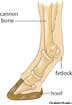
hoof:
indefatigable:Incapable or seemingly incapable of being fatigued; tireless
seclusion : the quality of being secluded from the presence or view of others
Scorn:Contempt or disdain felt toward a person or object considered despicable or unworthy
savage:Not domesticated or cultivated; wild
Devoured:To eat up greedily.
littered:A disorderly accumulation of objects; a pile.
littered:A disorderly accumulation of objects; a pile.
Pail:A watertight cylindrical vessel, open at the top and fitted with a handle; a bucket.
<=*FlogTo beat severely with a whip or rod.
skirmishing:A minor battle in war, as one between small forces or between large forces avoiding direct conflict.
manoeuvre:a plan for attaining a particular goal
Geese:Any of various wild or domesticated water birds of the family Anatidae, and especially of the genera Anser and Branta, characteristically having a shorter neck than that of a swan and a shorter, more pointed bill than that of a duck.
ignominious :Marked by shame or disgrace
Hiss: A sharp sibilant sound similar to a sustained.
An expression of disapproval, contempt, or dissatisfaction conveyed by use of this sound.
An expression of disapproval, contempt, or dissatisfaction conveyed by use of this sound.
impromptu:Prompted by the occasion rather than being planned in advance
Stroll: To go for a leisurely walk
Blithe:Carefree and lighthearted.
Prance:To spring forward on the hind legs. Used of a horse.
breech:The lower rear portion of the human trunk; the buttocks
Silage:Fodder prepared by storing and fermenting green forage plants in a silo.
Knoll:A small rounded hill or mound; a hillock.
Incubator:An apparatus in which environmental conditions, such as temperature and humidity, can be controlled, often used for growing bacterial cultures, hatching eggs artificially, or providing suitable conditions for a chemical or biological reaction.
Closeted:Being In a state of secrecy or cautious privacy.
Whimper:To cry or sob with soft intermittent sounds;
Aloof:Distant physically or emotionally; reserved and remote:
sordid: A trough or an open box in which feed for livestock is placed.
Veneration:feeling or showing profound respect or veneration
expulsion:the act of expelling or the state of being expelled.
Pellets:A small, solid or densely packed ball or mass, as of food, wax, or medicine.
cunning:Marked by or given to artful subtlety and deceptiveness.
subversive: cease to exists together
Linger:To remain feebly alive for some time before dying.
sly:Playfully mischievous; roguish.
quarry:An open excavation or pit from which stone is obtained by digging, cutting, or blasting.
Topple:to push or throw over; overturn or overthrow.
superintendence:To oversee and direct; supervise.
repose:the act of resting or the state of being at rest.
emboldened:To foster boldness or courage in; encourage.
snout: projecting nose, jaws, or anterior facial part of an animal's head.
vanity:The quality or condition of being vain.
Stern:Hard, harsh, or severe in manner or character:
Countenance:Appearance, especially the expression of the face:
Spinney: A small grove.
Surmount:To overcome (an obstacle, for example); conquer.
treacherous:Marked by betrayal of fidelity, confidence, or trust; perfidious.
scoundrels:A villian.
gander: A male goose.
Privy:Made a participant in knowledge of something private or secret:
Hitherto:Untill this time.
Detour:A roundabout way or course, especially a road used temporarily instead of a main route.
Smarted:to cause a sharp, usually superficial, stinging pain:
Brace:To get ready; make preparations.
Turnip:A widely cultivated Eurasian plant (Brassica rapa) of the mustard family, having a large fleshy edible yellow or white root.
Piebald:Spotted or patched, especially in black and white
Forbid:To command (someone) not to do something
wafted:To cause to go gently and smoothly through the air or over water.
Stratagem:A military maneuver designed to deceive or surprise an enemy.2. A clever, often underhanded scheme for achieving an objective.
Falter:A military maneuver designed to deceive or surprise an enemy.2. A clever, often underhanded scheme for achieving an objective.
Interment:The act or ritual of interring or burying.
Inebriates:To make drunk; intoxicate.
Rheum:A watery or thin mucous discharge from the eyes or nose.
Morose:Sullenly Melancholy;Sadness or Depression of Spirits
greyer:to become intermediate between two.
muzzle:The forward, projecting part of the head of certain animals, such as dogs, including the mouth, nose, and jaws; the snout.
Taciturn:Habitually Untalkative;
Filial:Of, relating to, or befitting a son or daughter:
Fluttering:to wave or flap rapidly in an irregular manner
Masthead:The listing in a newspaper or periodical of information about its staff, operation, and
circulation.
untrodden:lacking pathways;
birch:Any of various deciduous trees or shrubs of the genus Betula
Trifle:Something of little importance or value.
Consent:To give assent, as to the proposal of another; agree.
Creep:To move with the body close to the ground, as on hands and knees.
incumbent:Imposed as an obligation or duty; obligatory: felt it was incumbent on us all to help.
subsist:to exist.
Flit:To move about rapidly and nimbly
sordid: A trough or an open box in which feed for livestock is placed.
Veneration:feeling or showing profound respect or veneration
expulsion:the act of expelling or the state of being expelled.
Pellets:A small, solid or densely packed ball or mass, as of food, wax, or medicine.
cunning:Marked by or given to artful subtlety and deceptiveness.
subversive: cease to exists together
Linger:To remain feebly alive for some time before dying.
sly:Playfully mischievous; roguish.
quarry:An open excavation or pit from which stone is obtained by digging, cutting, or blasting.
Topple:to push or throw over; overturn or overthrow.
superintendence:To oversee and direct; supervise.
repose:the act of resting or the state of being at rest.
emboldened:To foster boldness or courage in; encourage.
snout: projecting nose, jaws, or anterior facial part of an animal's head.
vanity:The quality or condition of being vain.
Stern:Hard, harsh, or severe in manner or character:
Countenance:Appearance, especially the expression of the face:
Spinney: A small grove.
Surmount:To overcome (an obstacle, for example); conquer.
treacherous:Marked by betrayal of fidelity, confidence, or trust; perfidious.
scoundrels:A villian.
gander: A male goose.
Privy:Made a participant in knowledge of something private or secret:
Hitherto:Untill this time.
Detour:A roundabout way or course, especially a road used temporarily instead of a main route.
Smarted:to cause a sharp, usually superficial, stinging pain:
Brace:To get ready; make preparations.
Turnip:A widely cultivated Eurasian plant (Brassica rapa) of the mustard family, having a large fleshy edible yellow or white root.
Piebald:Spotted or patched, especially in black and white
Forbid:To command (someone) not to do something
wafted:To cause to go gently and smoothly through the air or over water.
Stratagem:A military maneuver designed to deceive or surprise an enemy.2. A clever, often underhanded scheme for achieving an objective.
Falter:A military maneuver designed to deceive or surprise an enemy.2. A clever, often underhanded scheme for achieving an objective.
Interment:The act or ritual of interring or burying.
Inebriates:To make drunk; intoxicate.
Rheum:A watery or thin mucous discharge from the eyes or nose.
Morose:Sullenly Melancholy;Sadness or Depression of Spirits
greyer:to become intermediate between two.
muzzle:The forward, projecting part of the head of certain animals, such as dogs, including the mouth, nose, and jaws; the snout.
Taciturn:Habitually Untalkative;
Filial:Of, relating to, or befitting a son or daughter:
Fluttering:to wave or flap rapidly in an irregular manner
Masthead:The listing in a newspaper or periodical of information about its staff, operation, and
circulation.
untrodden:lacking pathways;
birch:Any of various deciduous trees or shrubs of the genus Betula
Trifle:Something of little importance or value.
Consent:To give assent, as to the proposal of another; agree.
Creep:To move with the body close to the ground, as on hands and knees.
incumbent:Imposed as an obligation or duty; obligatory: felt it was incumbent on us all to help.
subsist:to exist.
Flit:To move about rapidly and nimbly
Subscribe to:
Posts (Atom)